Your 30 Day SLG
Factory
What they're saying about us

This podcast is a game-changer! The episodes are packed with actionable insights, and the hosts really know how to keep you engaged. I feel like I’m constantly learning something new.
We’ve been recommending Transistor to everyone we know who’s interested in starting a podcast.

I’ve learned so much from this podcast! Whether it’s business, personal growth, or just having fun, every episode feels like time well spent. The perfect blend of entertainment and knowledge. The hosts make complex topics easy.

I’ve been listening since day one, and it just keeps getting better! The production quality is top-notch, and I always walk away with fresh perspectives.
This podcast has transformed my mornings. The hosts dive deep into topics I care about and offer insights I can apply in my life right away. Highly recommend!
After testing out 20+ podcast hosting platforms and working with numerous clients setting up their hosting, Transistor.FM is the one I always recommend because of its unique features, accessibility and user interface.
After testing out 20+ podcast hosting platforms and working with numerous clients setting up their hosting, Transistor.FM is the one I always recommend because of its unique features, accessibility and user interface.
When people ask me which podcast host I recommend, I say: 'Transistor is 100% the way to go.
I’ve been listening since day one, and it just keeps getting better! The production quality is top-notch, and I always walk away with fresh perspectives.

How to Build an AI-Augmented Systems-Led Growth Factory
The full system I describe in Pipes Before the Chocolate took me three years to build. It covers content engines, sales outbound, inbound processing, thought leadership repurposing, ABM, event workflows, and case study production, all connected through a structured content library and a central knowledge layer I call the Brand Brain.
You don't build all of that in a month. Nobody does. I didn't.
But you don't need the full system to start seeing results. You need the minimum viable factory: enough infrastructure to produce measurable pipeline results within 60 days, built by one person with a Claude subscription and roughly $500/month in tooling.
This is the build order.
Before You Build: The Four Audits (Days 1-3)
Before you lay a single pipe, you need to know what you already have.
I recommend spending two to three days on these before you touch a single workflow. It feels slow. But it saves you weeks of rework, because the most common reason systems produce bad output is that they were built on incomplete inputs.
1. The Content Audit
Inventory every piece of content your company has produced that's worth keeping. Blog posts, case studies, landing pages, one-pagers, competitive positioning docs, presentations, webinar recordings. You're not looking for everything. You're looking for assets that are accurate, current, and representative of who you are and what you sell.
For each asset, ask three questions: Is this still accurate? Does it reflect our current product and positioning? Is it good enough that we'd want a workflow to reference it or a new team member to learn from it?
If yes, it goes in the library. If it's outdated but salvageable, flag it for a refresh. If it's irrelevant, archive it.
Most companies discover they have more usable content than they thought, scattered across more places than they realized. You probably have 15 to 30 pieces worth tagging right now.
Time: half a day to a full day.
2. The Context Audit
This is where you capture the institutional knowledge that currently lives in people's heads. Your value propositions, your ICP profiles, and the specific language your best customers use to describe the problem you solve.
Interview your best salesperson. Interview your best customer success manager. Interview the founder or product lead. Ask them:
- When you're explaining what we do to someone who's never heard of us, what do you say?
- When a customer renews, what's the reason they give?
- When we lose a deal, what's the reason?
The answers become the raw material for your messaging framework and ICP definitions. Tag each value prop by persona and use case. Write ICP profiles with real language, not marketing language. Document competitive positioning honestly, not aspirationally.
Time: three to four hours of interviews plus two hours of structuring.
3. The Process Audit
Map the actual processes your team runs. Not the org chart version. The real, daily version.
How does a blog post go from idea to published? How does a sales rep prepare for a call? What happens when an inbound lead submits a form? How does a case study move from customer agreement to finished asset?
Document each one step by step. Where are the handoffs? Where are the bottlenecks? Where does the same work get done twice?
This tells you which processes are candidates for workflows (the defined ones, where the steps are the same every time and only the inputs change) and which might eventually support agentic capabilities (the ones that require judgment between steps).
Time: a few hours per department.
4. The Quality Audit
This is the one most teams skip, and it's the one that matters most.
For every type of content your system will produce (blog posts, outbound emails, case studies, one-pagers, follow-up emails), identify the person who knows what good looks like. Then capture their standard.
What makes a blog post good enough to publish versus one that needs another pass? What separates a compelling outbound email from a generic one? What's the difference between a case study that sales actually shares and one that sits on the website untouched?
Each person who owns quality for a specific output type should produce one annotated example: here's a good one, here's what makes it good, here's a common mistake to avoid. These become the quality templates your workflows use as benchmarks.
Without the quality template, the output is structurally competent and tonally generic. With it, the output matches your brand.
Time: an hour per output type.
Week 1: Audits and Foundation
Run the four audits. In parallel:
- Define your ICP personas (two to three maximum).
- Write your value prop library (five to eight core value propositions, each tagged by persona and pain point).
- Create your tagging taxonomy (define the allowed values for each metadata category: persona, buying stage, topic cluster, pain point, industry).
- Set up your content library. A Notion database, an Airtable base, or a Supabase instance with the right schema.
- Start populating the Brand Brain with the audit outputs.
- Tag your existing best content.
The Brand Brain is the structured knowledge layer that holds your messaging, your ICP definitions, your brand voice, your product truths, and your quality standards. It's what makes every workflow pull from the same foundation. Without it, every tool your team builds encodes a slightly different version of your brand.
What you have at the end of Week 1: A Brand Brain with your messaging, ICP, and quality standards populated. A structured content library with your existing best assets tagged. A tagging taxonomy ready for everything you produce going forward.
Week 2: Content Engine
Build your first content workflow: topic brief to AI draft to human review to publish.
The workflow I use follows a four-stage model:
Stage 1: Strategy (human). Select the keywords. Which terms to target, for which personas, at which buying stage, with what competitive angle. This is the human judgment the system can't replace. It takes maybe 10 minutes per piece, but those 10 minutes determine whether the system produces pipeline content or noise.
Stage 2: Brief and draft (AI workflow). The workflow searches the keyword across Google, extracts the top-ranking posts, runs a content gap analysis, searches your existing content library for internal links, does external research for supporting sources, assembles a structured brief, generates a first draft, and runs an editing pass based on your brand voice and quality guidelines.
One keyword in, one edited draft out. The whole sequence runs without you touching it.
Stage 3: Review (human). Review every article before it publishes. Some days the drafts are 85% there and you're making minor adjustments. Other days they're 65% and you're rewriting the introduction or adding a personal detail that makes the piece feel human. This is the quality filter.
Stage 4: Publish (automated). Publishing to your CMS, tagging in the content library, and distribution notifications can all be automated.
You don't need to start at five articles a day. Start with one article per day and iterate on the workflow until the output quality is consistent. Produce your first batch of five to ten ICP-focused articles. Tag and store each one in the library.
What you have at the end of Week 2: A content engine producing daily content. A library growing by five to ten tagged assets per week.
Week 3: Sales Connection
Build the account enrichment workflow: company data, hiring signals, recent news, tech stack. Sources include Apollo, LinkedIn Sales Navigator, and targeted scraping for specific signals. No single enrichment source is complete.
You need at least two to three.
Build a simple outreach generation workflow that takes the enriched account brief and a matched value prop and produces a personalized email draft. Test it against ten target accounts. Review the output. Refine.
Then connect the outreach to the content library so the system can attach relevant resources.
At this point you need enough content that the system can find something relevant for most account profiles. Thirty assets tagged across three to four industries and two to three buying stages is a workable starting point.
What you have at the end of Week 3: An outbound system generating personalized emails for target accounts, with relevant content attached from the library.
Week 4: Inbound and Repurposing
Inbound processing. Set up your lead scoring criteria. Spend the time to define what a high-intent lead looks like for your specific business. Don't copy someone else's scoring model. Build one from your own conversion data: which attributes and behaviors have historically correlated with deals that close?
Build the inbound enrichment and response generation workflow. Even a simplified version that enriches the lead and generates a personalized response beats the industry average response time by a mile. The system should reference what the lead actually did, not send a generic "thanks for your interest."
Repurposing. Record one conversation: a customer interview, a podcast pilot, or a structured internal discussion. Run the transcript through a repurposing workflow. One conversation should produce a blog post, a LinkedIn post, a newsletter draft, a YouTube description, a landing page, quote cards, and social clips.
Tag and store the outputs in the library.
This is where the system starts to feel like a system rather than a collection of parts. One conversation produces ten assets that get distributed by the outbound system, surfaced by the inbound system, and referenced by the sales team.
What you have at the end of Week 4: An inbound system responding to leads in under five minutes with personalized context. A repurposing workflow that proves one conversation can become ten assets.
What You Have After 30 Days
- A Brand Brain with your messaging, ICP, and quality standards populated.
- A structured content library with 30 to 50 tagged assets.
- A content engine producing daily content.
- An outbound system generating personalized emails for target accounts.
- An inbound system responding to leads with personalized context.
- A repurposing workflow turning one conversation into ten assets.
That's the minimum viable factory.
It's not the full system. It's missing ABM, the case study production pipeline, the event segmentation workflows, and most of the connected workflow intelligence that makes the full system compound. But it's enough to produce measurable pipeline results within the first 60 days, and it's the foundation that everything else builds on.
What Comes After the 30 Days
The full build order continues:
Weeks 5-8: MOFU repurposing. Build the podcast or webinar repurposing workflow. Start feeding live conversations into the library. This is where compounding becomes visible.
Weeks 8-12: ABM. ABM is the last system to build because it depends on all the others. It needs the content library for asset assembly, the enrichment workflow for account intelligence, the value prop library for message matching, and the outbound infrastructure for multi-channel delivery. If you try to build ABM first, you'll end up with a sophisticated targeting system that has nothing relevant to say.
Ongoing from Week 4: Case studies. Start your case study pipeline early (identify and reach out to customers), but don't expect finished case studies until weeks 10 to 12. The customer approval process takes time regardless of how fast your internal system operates.
The Tool Stack
This is what I use. Tools change fast, so pay more attention to the function each tool serves than to the tool itself.
AI backbone: Claude (Anthropic). Content generation, transcript processing, outreach drafting, multi-step workflow processing. The quality of the output for B2B content use cases is noticeably better.
Workflow orchestration: FastAPI (custom). Full control over workflow steps, prompts, and quality checks. For teams without a developer, Make (formerly Integromat) or Zapier can handle most orchestration at the cost of some flexibility.
Structured data: Supabase. The content library, the Brand Brain, the customer language database, the account intelligence records, and tagged insights all live here. Postgres database with a clean API layer. Simple to set up, scales well.
CMS: Webflow. Publishing layer for the content engine. Best control over the publishing workflow and SEO technical layer without requiring engineering.
CRM: Salesforce or HubSpot. The CRM needs to be connected to your content library and your enrichment workflows. If they're disconnected, the inbound and outbound systems can't function.
Enrichment: Apollo, LinkedIn Sales Navigator, and custom scrapers. No single enrichment source is complete. You need at least two to three for a reliable account picture.
Automation glue: Zapier. The connective tissue between systems that don't have native integrations. Post-call transcript to content library. New content published to sales team notification. Lead score change to Slack alert.
Total cost: roughly $200 to $500/month depending on which tools you already have.
One Honest Admission
The system I described across the full book took me three years to build, and it's still evolving. The first version was ugly. The second version was better but still had gaps. The current version is the most complete, but I'm still finding things that are broken or missing every week.
A book about systems presents them in logical order. Reality is messier. You build the content engine and discover you don't have a tagging taxonomy. You build the outbound system and realize your value prop library is three bullet points from your website. You build the inbound processing workflow and find out your enrichment data is 40% incomplete.
That's normal. The system gets built by building it, not by planning it perfectly.
Start with the minimum viable factory. Build for 30 days. Then keep building.
Features section
Lorem ipsum dolor sit amet, consectetur adipiscing elit. Suspendisse tincidunt sagittis eros. Quisque quis euismod lorem. Etiam sodales ac felis id interdum.

Lorem ipsum dolor sit amet, consectetur adipiscing elit. Suspendisse tincidunt sagittis eros.

Lorem ipsum dolor sit amet, consectetur adipiscing elit. Suspendisse tincidunt sagittis eros.

Lorem ipsum dolor sit amet, consectetur adipiscing elit. Suspendisse tincidunt sagittis eros.
Lorem ipsum dolor sit amet, consectetur adipiscing elit. Suspendisse tincidunt sagittis eros.
Pipes Before Chocolate
How to build an AI-augmented go-to-market engine with a skeleton crew, content, sales outbound, inbound, ABM, and thought leadership, without a 15-person team or a six-figure tool budget.
Download for Free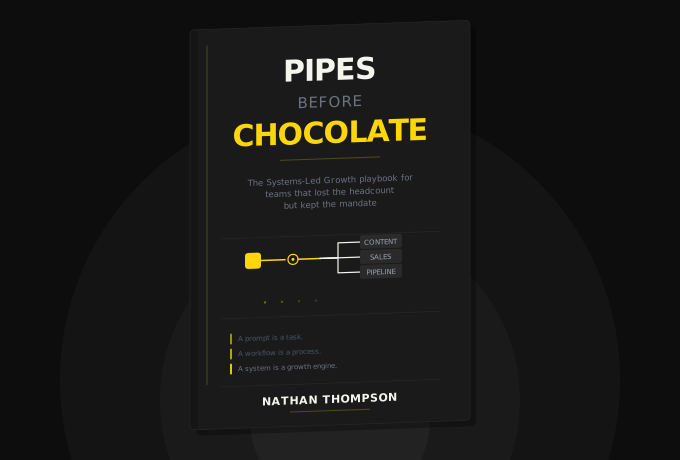

Frequently Asked Questions
A weekly podcast where real SaaS operators share the AI workflows they've built to survive skeleton-crew life. No thought leadership or sponsored hot takes. My goal in each episode is to focus on what's actually working.
Get notified every time we post an new episode
Lorem ipsum dolor sit amet, consectetur adipiscing elit.