How to Run Your
Process Audit
What they're saying about us

This podcast is a game-changer! The episodes are packed with actionable insights, and the hosts really know how to keep you engaged. I feel like I’m constantly learning something new.
We’ve been recommending Transistor to everyone we know who’s interested in starting a podcast.

I’ve learned so much from this podcast! Whether it’s business, personal growth, or just having fun, every episode feels like time well spent. The perfect blend of entertainment and knowledge. The hosts make complex topics easy.

I’ve been listening since day one, and it just keeps getting better! The production quality is top-notch, and I always walk away with fresh perspectives.
This podcast has transformed my mornings. The hosts dive deep into topics I care about and offer insights I can apply in my life right away. Highly recommend!
After testing out 20+ podcast hosting platforms and working with numerous clients setting up their hosting, Transistor.FM is the one I always recommend because of its unique features, accessibility and user interface.
After testing out 20+ podcast hosting platforms and working with numerous clients setting up their hosting, Transistor.FM is the one I always recommend because of its unique features, accessibility and user interface.
When people ask me which podcast host I recommend, I say: 'Transistor is 100% the way to go.
I’ve been listening since day one, and it just keeps getting better! The production quality is top-notch, and I always walk away with fresh perspectives.

How to Map What Your Team Actually Does
Most companies know what their teams are supposed to do. Very few know what they actually do.
The process audit maps reality. Not the org chart version, not the quarterly review version, not the workflow diagram someone drew on a whiteboard eighteen months ago that nobody looks at anymore. The real, daily version: how a blog post goes from idea to published, what happens when an inbound lead submits a form, how a sales rep prepares for a call, where work gets duplicated, where handoffs break.
This is the third of four audits I recommend before building any AI-augmented system. It serves two purposes.
First, it tells you what to automate. Not everything should be a workflow. The process audit separates the defined processes (same steps every time, different data flowing through) from the ones that require judgment at each step. Defined processes become workflows. Judgment-heavy processes stay human, at least for now.
Second, it becomes the process documentation layer of your Brand Brain. When someone builds a new tool or a new workflow on top of the system, they need to understand how it connects to what everyone else is doing. Without process documentation, every new tool is built in isolation. With it, every new tool connects to the whole.
What You're Mapping
You're mapping processes, not roles. The distinction matters.
A role description says "the content manager handles blog production." A process map says "a blog post starts with keyword selection on Monday, moves to brief creation by Tuesday, goes through AI draft generation on Wednesday, gets human review on Thursday, and publishes on Friday. The keyword comes from the SEO strategy doc.
The brief template lives in Notion. The draft gets generated through the content workflow. The review happens in Google Docs. Publishing happens in Webflow. The sales team is notified via Slack."
The first description tells you who's responsible. The second tells you how the work actually flows, where the inputs come from, where the outputs go, and where the bottlenecks live.
Map the second version.
The Processes to Map
Start with the processes that touch your go-to-market motion directly. These are the ones that become workflows first because they have the highest impact on pipeline.
Content Production
How does a blog post go from idea to published?
Walk through every step. Where does the topic come from? Who decides what to write? How does research happen? Who writes the brief? Who writes the draft? How does review work? How many rounds of review? Who approves it for publishing? How does it get published? How does the sales team find out it exists? How does it get tagged and stored?
You'll almost certainly find steps that are redundant (two people reviewing the same thing for the same criteria), steps that are manual but shouldn't be (copying the published URL into a Slack channel by hand), and steps that are missing entirely (nobody tags the content after publishing, which means it never enters the structured library).
Sales Call Follow-Up
What happens after a sales rep finishes a call?
Does the rep write their own follow-up email? How long does that take? Do they reference anything from the call or send a generic template? Do they attach relevant content? How do they find that content? Does anyone else on the team know what was discussed on the call? Is the transcript stored anywhere? Are insights extracted? Do recurring themes get tracked?
For most teams, the answer to most of those questions is "the rep does it manually" or "it doesn't happen." That's a process with enormous automation potential.
Inbound Lead Processing
What happens when someone submits a form on your website?
How fast does the response go out? Is it personalized or generic? Does anyone enrich the lead with company data before responding? How does routing work? What determines whether the lead goes to sales versus into a nurture sequence? Is the lead scored? Based on what criteria? Who defined those criteria and when were they last updated?
The gap between "form submitted" and "personalized response sent" is where most B2B companies lose pipeline. Mapping this process usually reveals that the response is either generic, slow, or both.
Case Study Production
How does a case study go from customer agreement to published asset?
Who identifies the customer? How do they get their agreement? Who conducts the interview? Who writes it up? How does it get approved by the customer? How long does the customer approval process take? (This is almost always the bottleneck.) Where does the finished case study get stored? Does the sales team know it exists? Can they find it when they need it?
Event or Webinar Workflow
What happens before, during, and after a webinar?
How does the topic get chosen? How does promotion work? Who creates the registration page? What happens to the recording afterward? Does anyone repurpose it? Into what? How do attendees get followed up with? Is follow-up segmented by behavior (attended full session vs. dropped off early vs. registered but didn't show)?
ABM Campaign Assembly
If your team does any account-based work, how does a campaign get built for a target account?
Who selects the account? What research gets done? Where do the personalized assets come from? How long does it take to assemble a campaign for one account? Is it hours, days, or weeks?
What to Document for Each Process
For every process you map, capture five things:
1. The Steps
List every step in order. Be granular. "Write the blog post" is not a step. "Open the brief template in Notion, review the keyword and competitive angle, draft the outline, write the first draft, run it through Grammarly, submit for review" is a set of steps.
The more granular the map, the easier it is to identify which steps are candidates for automation and which require human judgment.
2. The Inputs
What does each step need to start? A keyword list? A call transcript? An enriched lead profile? A customer's approval? A competitive positioning doc?
Inputs tell you what the workflow needs to pull from. If a step requires a value prop tagged by persona, that value prop needs to exist in the Brand Brain before the workflow can function. Missing inputs are the most common reason new workflows fail.
3. The Outputs
What does each step produce? A draft? A tagged asset? A follow-up email? A meeting prep brief? A one-pager?
Outputs tell you what gets fed into the next step and what gets stored in the structured library. If an output isn't stored or passed forward, it dies. A sales call transcript that produces insights nobody records is a wasted input.
4. The Handoffs
Where does work move from one person (or one system) to another? The handoff points are where things break. The writer finishes a draft and emails it to the reviewer. The reviewer finishes and messages the publisher on Slack. The publisher copies it into the CMS and forgets to notify the sales team.
Every handoff is a potential failure point and a potential automation opportunity. A workflow that moves the draft directly from generation to review to publishing, notifying the right people at each stage, eliminates the handoff breakdowns.
5. The Bottlenecks
Where does work sit waiting? How long does each step take versus how long the wait between steps takes?
In most content workflows, the actual writing takes two hours. The wait between "draft submitted" and "review completed" takes two to five days. The bottleneck isn't production. It's the review queue.
Knowing this changes what you automate. You don't need to make the writing faster. You need to make the review process more efficient, or reduce the amount of review needed by improving draft quality.
The Defined vs. Decides Filter
Once you've mapped each process, run it through a simple filter.
If the process is defined, build a workflow.
Can you write down the steps? Are the inputs predictable? Does the same sequence apply every time with different data flowing through it? If a human could write an SOP for it, it should be a workflow.
Content production, podcast repurposing, post-call follow-up generation, lead enrichment, case study extraction. These are all defined processes. The steps are the same every time. Only the data changes.
If the process decides, consider an agent (later).
Does the system need to observe something, evaluate it against context, choose what to do, and act differently depending on what it finds? That's agentic territory, and for most teams in 2026, it's premature.
Account signal monitoring where the system detects a hiring signal and evaluates whether it's relevant to your ICP. Dynamic lead scoring that adjusts routing in real time. Competitive intelligence that detects a pricing change and decides which accounts need to hear about it.
These are real use cases, but they require the workflow infrastructure to be solid first. You can't build reliable agents on unreliable data.
The mistake I see most often: companies trying to make agents do workflow work. They build an "autonomous content agent" when what they need is a content production workflow with a human review gate. The agent adds complexity without adding value because the process was defined all along.
Priority Order
You'll map more processes than you can automate immediately. Prioritize based on two criteria:
Impact on pipeline. Which process, if automated and connected to the rest of the system, would produce the most pipeline value? For most teams, the answer is content production (because it feeds everything else) or sales call follow-up (because the gap between "great call" and "great follow-up" is where pipeline leaks).
Current pain. Which process causes the most frustration, takes the most time, or breaks the most often? Automating a painful process builds team buy-in for the system. If the first workflow you build saves someone three hours a week, they'll advocate for the next five.
Start with the process that scores highest on both. For most skeleton-crew teams, that's the content engine.
Time Investment
A few hours per department. If you're a one-person team covering all functions, plan for a full day across all processes. If you have two to three people, split it up: each person maps the processes they own, then you spend an hour together identifying overlaps, handoff points, and shared inputs.
The mapping itself is fast. The value comes from what it reveals: the redundant steps, the missing handoffs, the bottlenecks nobody acknowledged, and the processes that are clearly defined and ready to become workflows.
Features section
Lorem ipsum dolor sit amet, consectetur adipiscing elit. Suspendisse tincidunt sagittis eros. Quisque quis euismod lorem. Etiam sodales ac felis id interdum.

Lorem ipsum dolor sit amet, consectetur adipiscing elit. Suspendisse tincidunt sagittis eros.

Lorem ipsum dolor sit amet, consectetur adipiscing elit. Suspendisse tincidunt sagittis eros.

Lorem ipsum dolor sit amet, consectetur adipiscing elit. Suspendisse tincidunt sagittis eros.
Lorem ipsum dolor sit amet, consectetur adipiscing elit. Suspendisse tincidunt sagittis eros.

Amet minim mollit non deserunt
Amet minim mollit non deserunt

Amet minim mollit non deserunt
Amet minim mollit non deserunt


Slideshow gallery section title goes here
Lorem ipsum dolor sit amet, consectetur adipiscing elit. Suspendisse tincidunt sagittis eros. Quisque quis euismod lorem.
Pipes Before Chocolate
How to build an AI-augmented go-to-market engine with a skeleton crew, content, sales outbound, inbound, ABM, and thought leadership, without a 15-person team or a six-figure tool budget.
Download for Free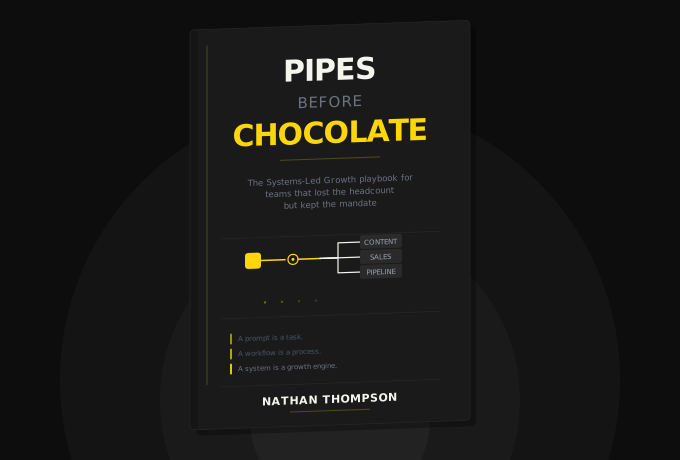

Frequently Asked Questions
A weekly podcast where real SaaS operators share the AI workflows they've built to survive skeleton-crew life. No thought leadership or sponsored hot takes. My goal in each episode is to focus on what's actually working.
Get notified every time we post an new episode
Lorem ipsum dolor sit amet, consectetur adipiscing elit.