How to Run Your
Content Audit
What they're saying about us

This podcast is a game-changer! The episodes are packed with actionable insights, and the hosts really know how to keep you engaged. I feel like I’m constantly learning something new.
We’ve been recommending Transistor to everyone we know who’s interested in starting a podcast.

I’ve learned so much from this podcast! Whether it’s business, personal growth, or just having fun, every episode feels like time well spent. The perfect blend of entertainment and knowledge. The hosts make complex topics easy.

I’ve been listening since day one, and it just keeps getting better! The production quality is top-notch, and I always walk away with fresh perspectives.
This podcast has transformed my mornings. The hosts dive deep into topics I care about and offer insights I can apply in my life right away. Highly recommend!
After testing out 20+ podcast hosting platforms and working with numerous clients setting up their hosting, Transistor.FM is the one I always recommend because of its unique features, accessibility and user interface.
After testing out 20+ podcast hosting platforms and working with numerous clients setting up their hosting, Transistor.FM is the one I always recommend because of its unique features, accessibility and user interface.
When people ask me which podcast host I recommend, I say: 'Transistor is 100% the way to go.
I’ve been listening since day one, and it just keeps getting better! The production quality is top-notch, and I always walk away with fresh perspectives.

How to Inventory What You Have & Kill What You Don't Need
Before you build a single workflow, you need to know what you already have.
Most companies have more usable content than they think, scattered across more places than they realize. Blog posts in WordPress, case studies in Google Drive, one-pagers in someone's personal folder, competitive docs in a Confluence page nobody's opened since 2024, webinar recordings in a Zoom archive.
The content audit brings it all together. It's the first of four audits I recommend before building any AI-augmented system, and it's the longest. Half a day to a full day, depending on how scattered your assets are.
The reason this comes first: everything else depends on it. The content engine produces new assets that flow into your structured library. The outbound system draws from the library to personalize outreach. The ABM system assembles campaigns from it. The inbound system surfaces resources from it. If the library starts empty or starts full of outdated material, every workflow built on top of it produces worse output.
Good in, good out. That principle starts here.
What You're Looking For
You're not inventorying everything. You're inventorying everything worth keeping.
The distinction matters. Most companies have hundreds of content assets if you count everything ever produced. A significant percentage of those are outdated, off-brand, referencing old product names, citing stale data, or written for an audience you no longer target.
Putting all of that into your content library doesn't make the library comprehensive. It makes it noisy. And a noisy library produces noisy outputs, because when a workflow queries "give me the most relevant case study for a Series B fintech company," it might pull a case study from 2023 that references a product feature you renamed eight months ago.
You want a library of assets that are accurate, current, and representative of who you are right now and what you sell right now.
Where to Look
Start by listing every place your company stores content. This is usually more locations than anyone expects.
- CMS (WordPress, Webflow, whatever you publish on)
- Google Drive or Dropbox (team folders, personal folders, shared drives)
- Confluence or Notion (internal wikis, project pages)
- Slide decks (Google Slides, PowerPoint, Canva)
- CRM (email templates, sales sequences, attached documents)
- Video platforms (Zoom recordings, YouTube, Loom, Vimeo)
- Email marketing platform (newsletter archives, drip sequences)
- Social media (LinkedIn articles, Twitter threads that performed well)
- Personal folders (the ones your team members don't think anyone knows about)
- Slack or Teams (pinned documents, shared files in channels)
Ask every team member: "Where do you keep the content you actually use?" The answers will surface locations you didn't know existed.
The Three-Question Filter
For every asset you find, ask three questions:
1. Is this still accurate?
Does the content reflect reality as it exists today? Are the statistics current? Are the product descriptions correct? Are the competitive claims still valid? Does it reference features, pricing, or positioning that have changed?
If it's inaccurate, it either gets flagged for a refresh (if the core content is still valuable) or archived (if it's too far gone).
Common accuracy failures: case studies citing metrics from a product version that's been deprecated. Blog posts referencing a competitor's pricing from two years ago. Landing pages describing a feature that was renamed or sunset.
Any content with statistics older than 18 months in a market that moves this fast.
2. Does it reflect current product and positioning?
This is subtler than accuracy. A piece of content might be factually correct but strategically outdated. Maybe your positioning shifted from "AI writing tool" to "AI workflow platform" nine months ago, but half your blog posts still frame you as a writing tool.
The facts are fine. The framing is wrong.
Check each asset against your current positioning. If your ICP shifted, if your messaging evolved, if your competitive angle changed, content that was on-brand a year ago might be off-brand today.
3. Is it good enough that we'd want a workflow to reference it?
This is the quality gate. Imagine a sales rep finishes a call and the system automatically surfaces this asset as a recommended resource. Would you be comfortable with the prospect seeing it?
If the answer is "it's fine but not great," that's not good enough. A workflow that surfaces mediocre content erodes trust in the system. Reps stop using it. Prospects notice the gap between your brand promise and your content quality.
Only assets that pass all three questions go into the library.
How to Categorize What Passes
Everything that passes the three-question filter gets tagged. This tagging is what transforms a collection of files into a structured library that workflows can query.
Tag each asset across these dimensions:
Target persona. Who is this content for? The VP of Revenue Operations? The marketing manager? The technical evaluator? The founder? Be specific. "Marketers" is too broad. "Head of demand gen at a Series A SaaS company with no team" is specific enough for a workflow to match against an enriched lead profile.
Buying stage. Where does this fit in the buyer's journey?
- Awareness: they're learning about the problem. "What is revenue operations?" "How do B2B companies handle inbound leads?"
- Consideration: they're evaluating solutions. "Best revenue operations platforms." "Your product vs. competitor." "How to choose a [category] tool."
- Decision: they're choosing a vendor. "Your product pricing." "Implementation timeline." "Case studies from companies like mine."
Topic cluster. What subject does this address? Revenue operations? Content strategy? Sales enablement? ABM? Define your clusters before you start tagging so everyone uses the same categories.
Content type. Blog post? Case study? Quote card? Sales talking points? One-pager? Competitive positioning? Landing page? Webinar recording? The type determines how workflows use it. A case study gets attached to follow-up emails. A competitive positioning doc gets surfaced during deal prep. A quote card gets assembled into ABM landing pages.
Pain point. What specific problem does this content address? Implementation complexity? Team scaling? Data fragmentation? Reporting inefficiency? Cost reduction? This is the tag that makes outbound personalization work. When a prospect mentions a concern on a call, the system matches that concern to a pain point tag and surfaces the right content.
Industry. What vertical is this relevant to? Healthcare? Fintech? General SaaS? E-commerce? If the content isn't industry-specific, tag it as "general." But the more industry-specific content you have, the more personalized your workflows can be.
The Controlled Vocabulary
Define the exact tags allowed in each category before you start tagging. This is the single most important step in the audit, and it's the one most teams skip.
Without a controlled vocabulary, one person tags something "RevOps" and another tags the same category "Revenue Operations." Someone uses "Healthcare" while someone else uses "Health" or "Medical." Within six months, the taxonomy is messy, queries return inconsistent results, and the system's intelligence degrades.
Write the tag list. Make it the only option. No synonyms, no variations, no creative interpretations. If the allowed industry tags are "Healthcare," "Fintech," "General SaaS," and "E-commerce," those are the four options. Period.
This feels rigid. It is rigid. That rigidity is what makes every workflow produce consistent results six months from now.
What to Do With What Doesn't Pass
Assets that fail the three-question filter fall into three buckets:
Refresh candidates. The core content is valuable but the details are outdated. A case study with a great customer story but stale metrics. A blog post with a solid argument but 2024 statistics. A competitive comparison that's accurate except for one competitor's pricing change. Flag these for refresh and schedule them into your content engine's production queue.
Archive. The content is outdated and the core isn't worth saving. A blog post about a trend that's passed. A landing page for a product tier you no longer offer. A webinar recording from a pre-pivot era. Move these to an archive where they're accessible if someone specifically searches for them but don't surface in workflow queries.
Delete. Content that's actively harmful to your brand if a prospect finds it. Outdated product claims. Competitive positioning that's now inaccurate in a way that could damage credibility. Content targeting an audience you no longer serve. Remove it.
The Output
At the end of the content audit, you should have:
- A tagged library of 15 to 50 assets that pass all three quality gates (most companies land in this range; some have more, very few have fewer than 15 worth keeping)
- A controlled vocabulary document defining every allowed tag in every category
- A refresh queue of assets worth updating
- An archive of everything that didn't pass but might be useful for reference
- A gap analysis: which personas, buying stages, and pain points have no content at all
The gap analysis is especially valuable. It tells your content engine exactly what to produce first. If you have zero decision-stage content for your primary persona, that's where you start. If you have twelve blog posts about awareness-stage topics and nothing for consideration-stage comparisons, the priority is clear.
Time Investment
Half a day if your content is relatively organized and you have fewer than 200 assets to review. A full day if it's scattered across multiple platforms, multiple team members' personal folders, and nobody has done an inventory in over a year.
It feels slow. It saves you weeks of rework later, because every shortcut you take in the audit phase shows up as a quality problem in the production phase. A workflow that surfaces outdated content isn't just unhelpful. It actively teaches your team not to trust the system.
Build the foundation right. Then build on it.
Pipes Before Chocolate
How to build an AI-augmented go-to-market engine with a skeleton crew, content, sales outbound, inbound, ABM, and thought leadership, without a 15-person team or a six-figure tool budget.
Download for Free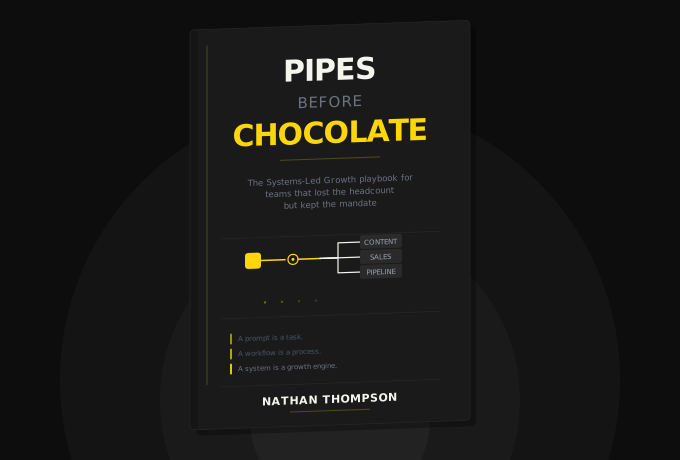

Frequently Asked Questions
A weekly podcast where real SaaS operators share the AI workflows they've built to survive skeleton-crew life. No thought leadership or sponsored hot takes. My goal in each episode is to focus on what's actually working.
Get notified every time we post an new episode
Lorem ipsum dolor sit amet, consectetur adipiscing elit.